
2026.1.12
Hello everyone!
Chem-man has released a new update for the new year, this update's primary addition is our new Chemical Sales functionality.
We've given the Chemical Sales screen a new look, and included the ability to apply a percentage based Sales tax!
Note: To include a sales tax, please go to setup menu, manage chemical/charges, add a "Sales Tax" (or you can rename) with an "other" type, N/A. You can then enter a % on the OTC chemical sales price. You can also use the same code for your field application sales taxes.
For more clarity, please give us a call at 870-238-9222.

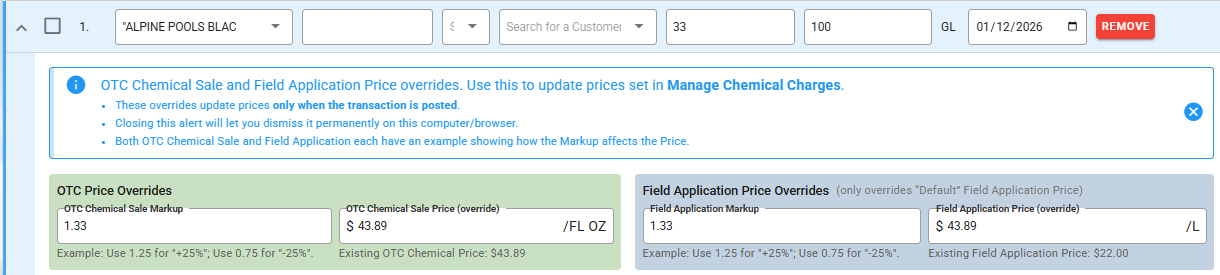
We've made an overhaul of our Inventory Additions/Deductions screen. We've cleaned it up with a nicer view, as well as allowing you to make Price adjustments without having to navigate between multiple pages.
When entering an addition, if you change the unit cost of the chemical, a menu will expand allowing you to also adjust the price for your Over the Counter sales and your Field Application Invoices! This will automatically allow you to update the chemical unit cost and chemical prices. It also allows you to use a markup tool!
Note: These prices will not be updated until posting.
Amongst the additions we've provided in this release, we've also made a lot of adjustments on the back end to make your workflow easier:
We've expanded our existing queue for uploading log files to include uploading locations as well. This allows you to continue using other functions of Chem-Man while large map files, including any S/T/R information attached, finish uploading.
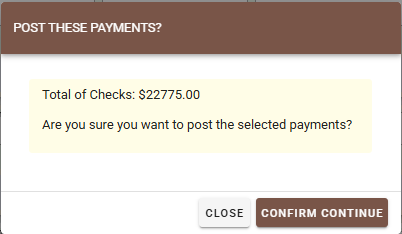
When posting payments, the created popup now includes a total of all of the selected payments you wish to post for easy reference.
3. There have been some general adjustments in regards to some of the terminology our reports use to make them more easily understandable and make more sense.
Reports have also received a lot of attention in this release! (Make sure you add any New Reports to your Permissions!) This is found under Utility Menu, Manage Users.
We've created a new report named "Logbook Report by Vehicle" that allows you to see totals done for a specific vehicle used. You can find this new report under Reports > Logbook Reports > Logbook Report by Vehicle.
We've adjusted some of the terminology to make reports easier to understand.
Our Logbook report by Field Location now has an added "Cost per Acre" total included.
